
How to Use Seedance 2.0 for AI Video (Without a CapCut Subscription)
Seedance 2.0 generates video with synchronized audio at $0.08/sec. Compare CapCut Pro costs, see what the model can do, and learn how to use it at raw API rates.
Seedance 2.0 is ByteDance's latest AI video model, and it does something no other model does right now: it generates synchronized audio and video in a single pass. Sound effects land on cue. Dialogue matches lip movements. Background music syncs to visual beats. All of that happens automatically, with no separate audio step.
Most people know Seedance through CapCut Pro, where it costs roughly $2.50 per 15-second clip on their advanced plan. But you can access the same model through API providers at $0.08 to $0.10 per second. A 10-second clip costs $0.80 instead of $2.50.
Here's everything you need to know about what Seedance 2.0 can do, what it costs, and how it compares to the other models available right now.
What Is Seedance 2.0 and Who Made It?
Seedance 2.0 is an AI video generation model built by ByteDance (the company behind TikTok and CapCut). It launched on February 10, 2026, and hit the #1 spot on the Artificial Analysis Video Arena leaderboard within weeks, beating Veo 3, Sora 2, and Runway Gen-4.5 in user preference rankings.
What sets it apart from every other video model is the unified audio-video architecture. Most models generate silent video, then you add audio separately. Seedance generates both together. The audio isn't just slapped on top. It's environment-aware. A whisper in a large room gets reverb. A door slam sounds different in a hallway than in a bedroom. Music syncs to visual cuts automatically.
It also accepts more input types than any other model. Through its "Omni Reference" mode, you can feed it up to 9 images, 3 video clips, and 3 audio clips alongside your text prompt. No other model accepts that many simultaneous inputs.
- ›Text-to-video: Describe what you want, get video with matching audio
- ›First and last frame: Control the start and end of the clip with reference images
- ›Omni Reference: Combine multiple images, video clips, and audio files as references in one generation
- ›Lip sync: Native support for 8+ languages with accurate mouth movement
- ›Multi-shot generation: Multiple camera cuts within a single 15-second clip
How Much Does Seedance 2.0 Cost?
A 10-second Seedance 2.0 Standard clip costs $1.00 through the API. The same generation on CapCut Pro's advanced plan costs roughly $2.50. On Dreamina (ByteDance's own creative platform), individual generations eat through credits fast, and the base subscription doesn't include many.
Cost Estimator
Here are the per-second rates through PiAPI (the current API provider for Seedance):
| Model | Per Second | 5s Clip | 10s Clip | 15s Clip |
|---|---|---|---|---|
| Seedance 2.0 Fast | $0.08 | $0.40 | $0.80 | $1.20 |
| Seedance 2.0 Standard | $0.10 | $0.50 | $1.00 | $1.50 |
| Kling V3.0 Standard (no audio) | $0.084 | $0.42 | $0.84 | $1.26 |
| Kling V3.0 Standard (with audio) | $0.126 | $0.63 | $1.26 | $1.89 |
| Veo 3.1 Fast (with audio) | $0.15 | $0.75 | $1.20 | N/A (8s max) |
Audio is always included with Seedance. There's no toggle and no surcharge. That makes the real comparison Seedance at $0.08-0.10/second vs Kling with audio at $0.126/second vs Veo Fast with audio at $0.15/second. Seedance is the cheapest option when you need video with sound.
Higgsfield recently opened Seedance 2.0 access globally across all plans. Their Plus plan ($49/month) gives credit-based access, but each Seedance generation eats through credits fast. Their Ultra plan ($239-375/month) includes 7-day unlimited Seedance access. Through Slates, you get Seedance at $0.08/second with no monthly subscription, no credit caps, and no expiring allowances.
50 ten-second Seedance Fast clips = $40/month in API costs. That same volume on CapCut Pro's advanced tier ($67/month) burns through your credit allocation in about 26 clips. You'd need to buy more credits or wait until next month. With API access, there are no credit caps and no monthly limits.
What about CapCut Pro?
CapCut Pro runs $9.99/month and gives you access to Seedance 2.0. But the base plan limits you to roughly 4 generations before you hit credit caps. The higher tiers ($27-67/month) give more credits, but per-clip costs still land around $1.50-2.50 each depending on duration and resolution. And credits expire monthly.
If you're generating more than a handful of clips per week, the subscription model gets expensive fast. API access at $0.08/second doesn't have monthly caps, expiring credits, or resolution restrictions. For a full breakdown of how subscription pricing compares to pay-per-use across all models, see AI Video Generator Pricing: Subscription vs Pay-Per-Use.
What Can Seedance 2.0 Actually Do?
Seedance generates video clips from 4 to 15 seconds long at native 2K resolution, 24fps. It supports six aspect ratios: 21:9, 16:9, 4:3, 1:1, 3:4, and 9:16. Every generation includes synchronized audio at no extra cost.
The model has two speed tiers. Fast is cheaper ($0.08/second) and generates in about 30-40 seconds for a 5-second clip. Standard costs $0.10/second with higher quality output, but takes 60-120 seconds.
The three generation modes
Text-to-video is the simplest. Describe your scene, and Seedance generates the video with matching audio. You can specify camera movements, lighting, and even multi-shot sequences with timing cues in your prompt.
First and last frame gives you more control. Upload a reference image for the start frame, end frame, or both, and Seedance generates the motion between them. This is useful for product animations, scene transitions, and maintaining visual consistency across a sequence.
Omni Reference is where Seedance really separates itself. You can combine up to 9 reference images, 3 video clips (15 seconds total), and 3 audio clips (15 seconds total) alongside your text prompt. Want a specific character wearing a specific outfit in a specific location with a specific backing track? Feed all of those as references. No other model accepts this many simultaneous inputs.
Native audio co-generation
This is the feature that makes Seedance genuinely different. The model generates audio and video together in one pass, not as separate steps stitched together afterward.
That means:
- ›Sound effects land precisely when the visual event happens
- ›Dialogue gets lip-synced automatically in 8+ languages
- ›Background music matches the mood and timing of visual cuts
- ›Environmental acoustics adapt to the scene (reverb in a cathedral, dry sound in a small room)
For comparison, Kling 3.0 charges extra for audio ($0.042/second surcharge). Veo 3.1 includes audio on Google Direct but charges double on fal.ai. Seedance includes it at the base rate, always.

How Does Seedance 2.0 Compare to Kling 3.0 and Veo 3.1?
Seedance is the cheapest model when you need audio, Kling gives you the most hands-on camera control, and Veo is the only one that outputs 4K. They're built for different shots. Here's a quick comparison across the things that actually matter for production work.
| Feature | Seedance 2.0 | Kling 3.0 | Veo 3.1 |
|---|---|---|---|
| Max duration | 15 seconds | 15 seconds | 8 seconds |
| Max resolution | Native 2K | 1080p | 4K |
| Audio included | Always, no extra cost | +$0.042/s surcharge | Included on Google Direct |
| Audio type | Full scene audio (SFX + dialogue + music) | SFX + dialogue | SFX + dialogue |
| Reference inputs | 9 images + 3 video + 3 audio | Text + single image | Up to 3 reference images |
| Camera controls | Prompt-based | 6-axis manual controls | Prompt-based |
| Multi-shot | Yes (prompt-based cuts) | Yes (AI Director, up to 6 cuts) | No |
| Lip sync | Native, 8+ languages | Via separate lip sync mode | No native lip sync |
| Per-second cost (with audio) | $0.08-0.10 | $0.126 | $0.10-0.40 |
When to pick Seedance: You need video with audio, you want to use multiple reference files, or you're doing high-volume work where the lower per-second cost adds up. It's also the best choice for music-driven content and product animations.
When to pick Kling: You need precise camera controls (6-axis), multi-character dialogue (Omni mode), or the AI Director for scripted multi-shot sequences. Kling gives you more hands-on control over exactly what happens in the frame.
When to pick Veo: You need 4K output. That's it, really. Veo is the only model that generates at 4K natively. If your project delivers in 4K, Veo is the only option.
For a deeper breakdown, see Kling vs Veo vs Sora: Which AI Video Model Should You Use?.
The right answer for most projects is to mix models. Use Seedance for clips that need audio, Kling for shots that need precise camera work, and Veo when you need 4K. Tools like Slates let you switch between all three in the same project.
What Are Seedance 2.0's Limitations?
The biggest limitation is aggressive content filtering. ByteDance blocks realistic human face references, celebrity names, and trademarked content. Beyond that, there are a few other things to know before you commit to a workflow around this model.
Content filtering is aggressive. After cease-and-desist letters from Disney, Paramount, and Netflix, ByteDance deployed heavy content restrictions. Seedance blocks realistic human face references (even custom AI-generated faces that don't depict real people), celebrity names, trademarked logos, and certain artistic styles. If you're building character-driven narrative content, expect to hit "Content Policy Violation" errors. Kling and Veo are both less restrictive here.
15-second hard cap per generation. There's an "extend" feature on consumer platforms (Dreamina, CapCut), but it often causes character inconsistency between the original clip and the extension. For clean longer sequences, you're better off generating separate clips and editing them together.
Identity drift across clips. Characters can shift slightly between separate generations. Faces change subtly, clothing details drift. Every AI video model has this problem right now, but keep it in mind for multi-shot projects.
No BYOK access yet. In Slates, Seedance 2.0 currently works through Credits only. You can't plug in your own API key the way you can with Kling or Veo. BYOK access through fal.ai is pending. Once that's live, you'll be able to use Seedance at raw API rates with your own key.
Warm color bias. Some users report a consistent warm tint affecting skin tones and neutral scenes. Not a dealbreaker, but something to correct in post if color accuracy matters.
How Do You Use Seedance 2.0 in Slates?
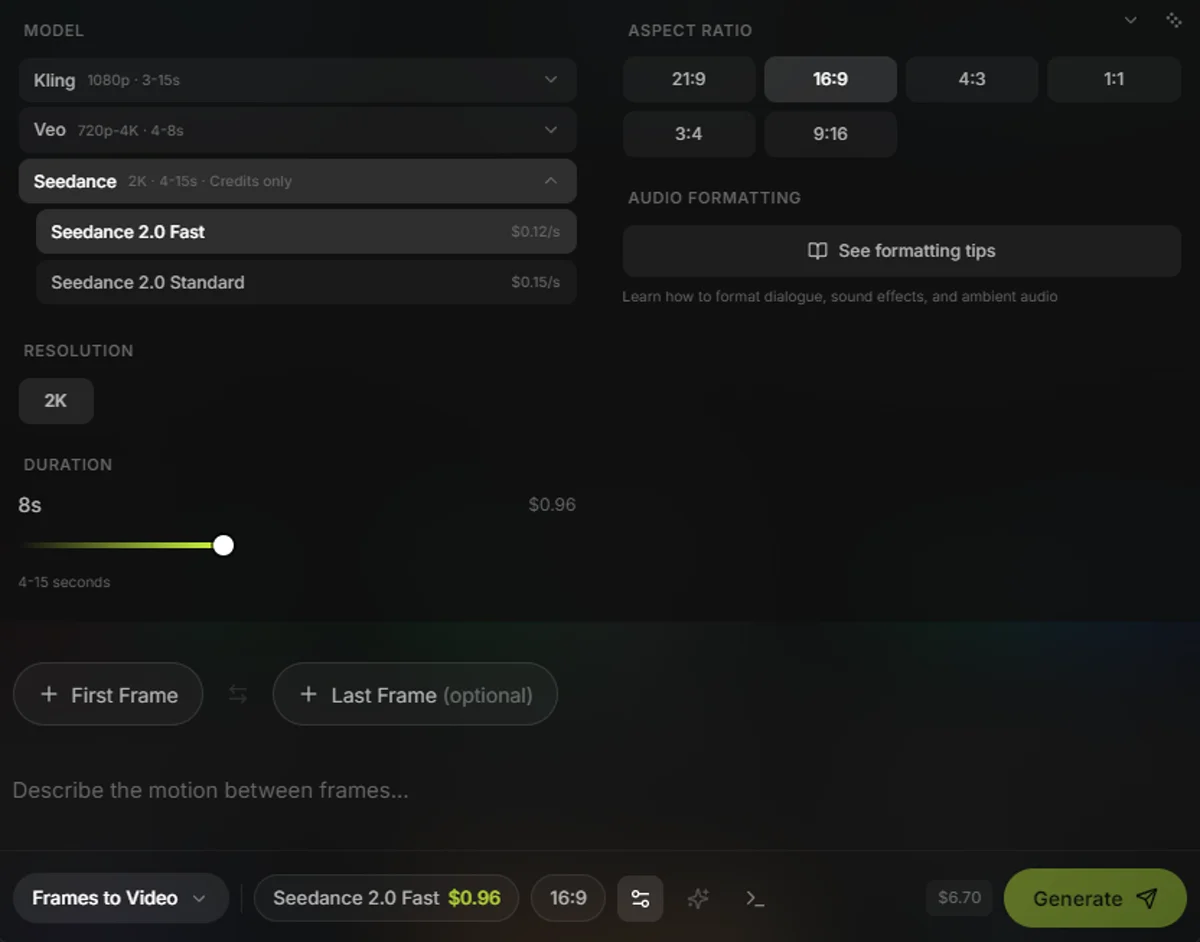
Seedance 2.0 is available in Slates as of April 2026. Download the app, select Seedance from the model dropdown, choose Fast or Standard, set your duration and aspect ratio, and generate. Check pricing for current credit rates.
Both Seedance variants are available through Slates Credits. Audio is always included. No extra settings needed. You pick your mode (text-to-video, first/last frame, or omni reference), write your prompt, and hit generate.
The cost estimator above shows exactly what each generation costs. Select "Seedance 2.0 Fast" or "Seedance 2.0 Standard" from the dropdown and adjust the clip length to see your per-clip and monthly costs.
For a step-by-step guide on setting up API keys for other models in Slates, see How to Use Your Own API Keys for AI Video Generation.
Seedance 2.0 output generated in Slates. Audio included automatically.
Frequently Asked Questions
They're good at different things. Seedance is better for audio-inclusive video, high-volume work at lower cost, and multi-reference workflows. Kling is better for precise camera controls, multi-character dialogue, and projects where you need granular direction over what happens in each frame. Most production workflows benefit from using both.
Yes. Seedance 2.0 is available through API providers like PiAPI at $0.08-0.10 per second. Tools like Slates give you access to Seedance through Credits without needing a CapCut or Dreamina subscription. No monthly fee, no credit caps, no expiring allowances.
Yes. Audio generation is built into the model architecture. Every Seedance clip includes synchronized sound effects, dialogue, and ambient audio. There's no way to disable it and no extra charge for it. If you don't want the audio, just mute it in your editor.
Native 2K resolution (approximately 2048x1152 at 16:9). This is higher than Kling's 1080p maximum but lower than Veo 3.1's 4K option. For most social media, web, and presentation use cases, 2K is more than enough.
ByteDance added aggressive content filters after receiving legal pressure from Disney, Paramount, Netflix, and Sony over deepfake concerns. The filters block realistic human faces as reference inputs, including AI-generated faces. This is the biggest limitation of Seedance right now. If you need face-consistent character work, Kling 3.0 or Veo 3.1 are less restrictive alternatives.
Last updated: April 9, 2026