
How to Use Your Own API Keys for AI Video Generation
Step-by-step guide to setting up Google and fal.ai API keys for AI video. Skip the subscription markup and pay raw rates like $0.084/sec for Kling.

You can skip the subscription markup on AI video generation by using your own API keys. Get a free key from Google AI Studio and fal.ai, paste them into a desktop tool, and every generation charges the provider's published rate. No middleman. Setup takes about 5 minutes. Here's how to do it.
What Does "Use Your Own API Keys" Mean?
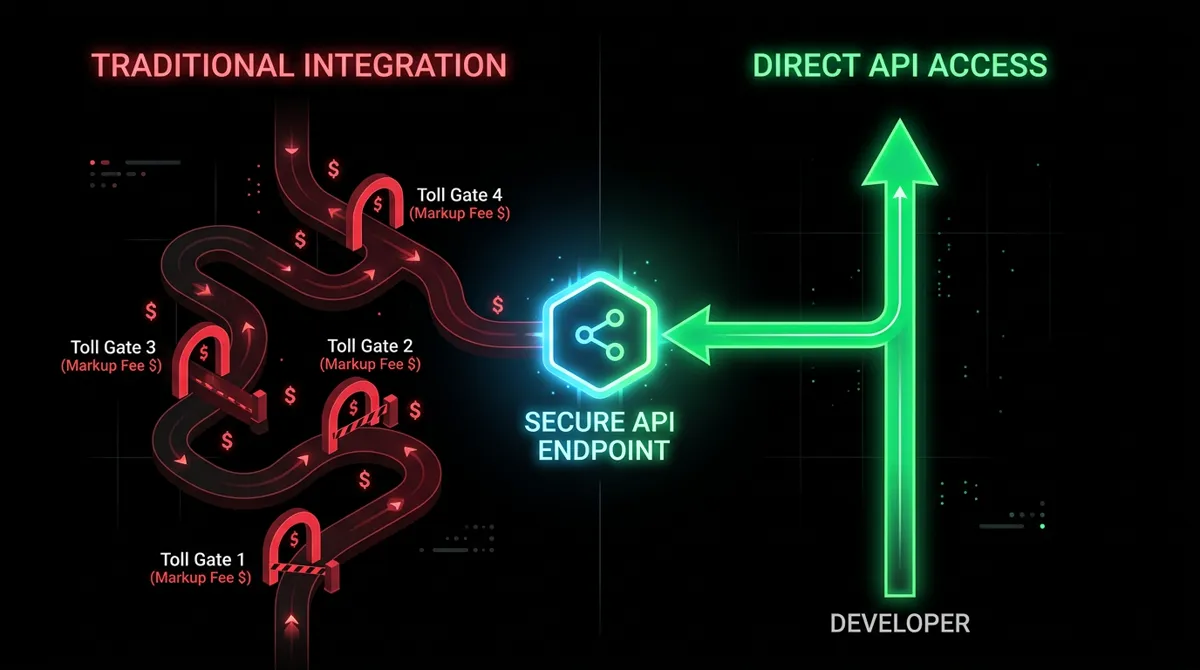
AI video models like Veo and Kling are available through APIs at published rates. You get a key from the provider, paste it into your creative tool, and pay the provider directly for every generation. No credit system, no monthly fee, no markup.
Some people call this "BYOK" (Bring Your Own Keys). Think of it like buying groceries instead of ordering DoorDash. Same food, you just skip the delivery fee and the service charge.
Most AI video platforms charge through credit systems. Runway, Higgsfield, Krea. Those credits represent API calls to the same underlying models you could access directly. The markup runs 2-6x the raw cost. An 8-second Veo 3.1 video that costs $0.80 at fal.ai's rate costs roughly $3.20 through Runway's credit system.
Using your own keys removes that layer entirely. Your keys, the provider's rate, nothing in between.
How Much Does Using Your Own Keys Save?
Depending on the model and platform, you save 50-75% per generation compared to subscription credit systems. The gap gets wider the more you create.
| Generation | Subscription Platform | Your Own Key (Direct API) | Savings |
|---|---|---|---|
| 8-sec Veo 3.1 Fast (no audio) | ~$3.20 (Runway effective rate) | $0.80 (fal.ai) | 75% |
| 5-sec Kling V3 Standard (no audio) | Requires $24.50+/mo tier (Higgsfield) | $0.42 | Pay only what you use |
| Single NB2 image (1K) | Part of monthly credit allotment | $0.067 (Google) | No monthly fee required |
| 50 Kling videos/month (5s, no audio) | $24.50-37.40/mo (Higgsfield Ultimate/Creator annual) | $21.00 total | Up to 44% less |
Higgsfield locks Kling 3.0 behind their Ultimate tier ($24.50/mo annual promo) and above. Basic and Pro users can't use it at all. With your own fal.ai key, you get Kling 3.0 at any usage level. No tier gating.
And if you route Kling generations through Kling Direct instead of fal.ai, it's even cheaper: $0.05/second instead of $0.084/second. That drops the same 50 clips to $12.50/month.
For a deeper breakdown of subscription vs pay-per-use math, see the pricing comparison.
What Do You Need to Get Started?
Two API accounts, both free to create, both pay-as-you-go. No subscription on either one.
- ›Google AI Studio for Veo 3.1 (video) and Nano Banana 2 (images)
- ›fal.ai for Kling V3.0, FLUX.2 Max, Seedream 5 Lite, and more
You can also add a Kling Direct API key if you want the cheapest possible Kling rates ($0.05/s vs $0.084/s on fal.ai). But it's optional. fal.ai covers Kling too.
Total setup time: about 5 minutes for both accounts.
How Do You Get a Google AI Studio API Key?
Go to Google AI Studio, sign in, and create an API key. The whole process takes under 2 minutes. You'll need to enable billing to access Veo and Nano Banana 2 (minimum $10 prepayment).
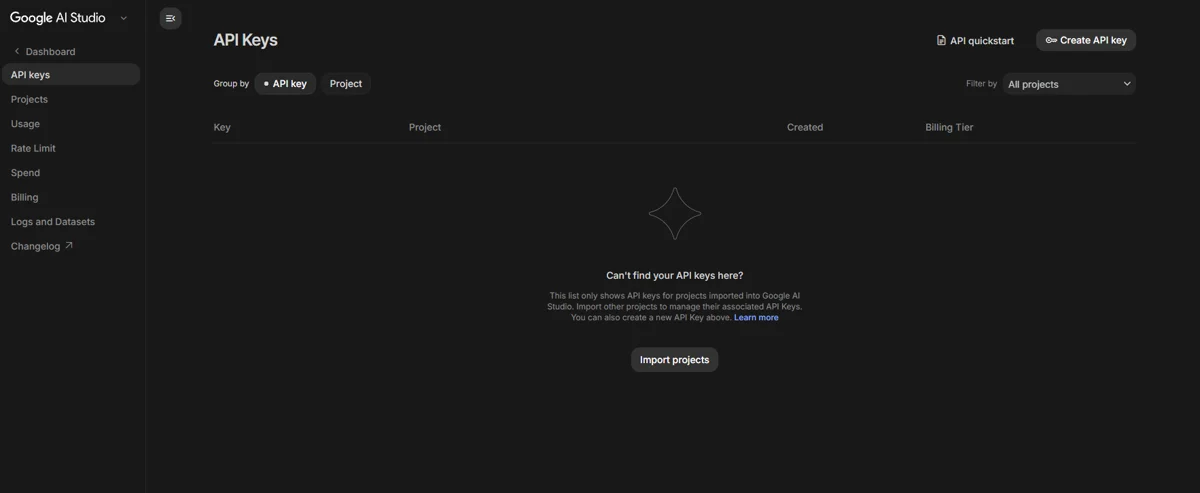
- ›Go to aistudio.google.com
- ›Sign in with your Google account
- ›Click "API keys" in the left sidebar
- ›Click "+ Create API Key" in the top right
- ›Name your key, select a project (or let it create one for you), and click "Create key"
- ›Copy the key
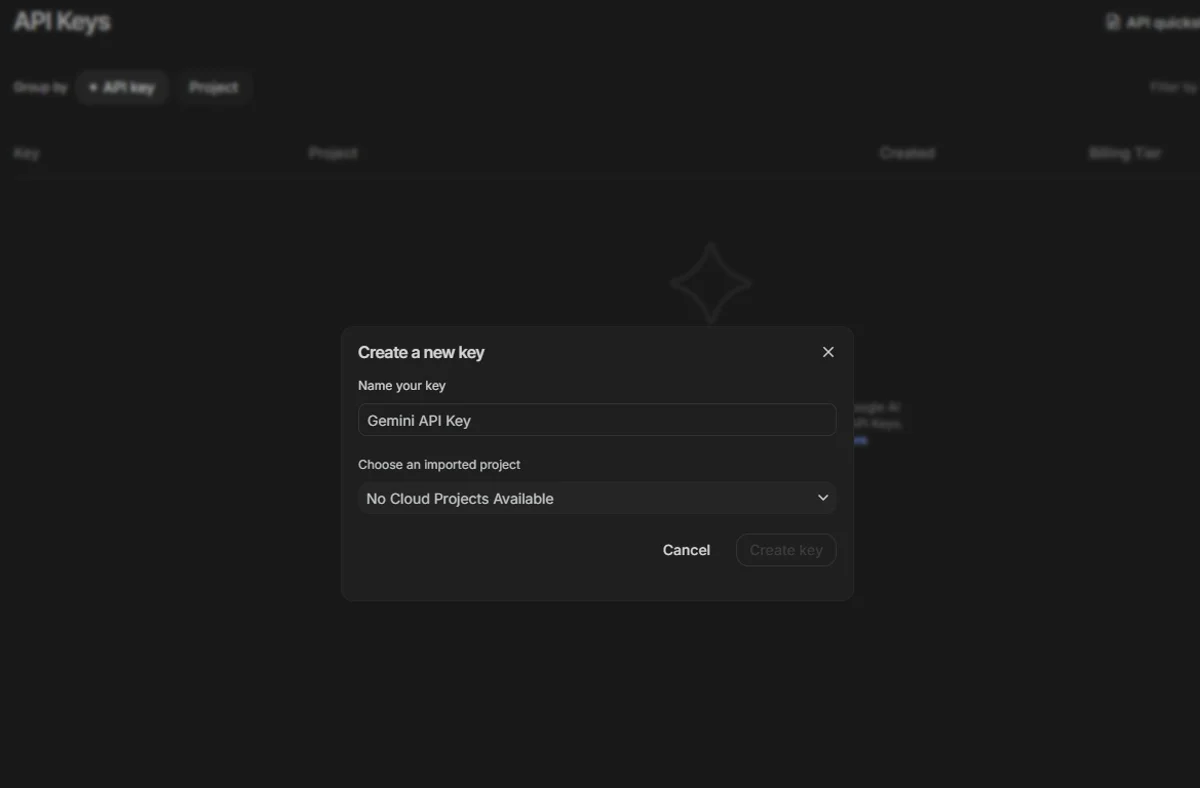
The key starts with AIzaSy and is about 39 characters long.
Billing is prepaid and pay-as-you-go. You add credit to your account through Google AI Studio, and generations draw from that balance. When it runs low, top it up.
When you route Veo through Google Direct, audio is automatically included with every generation. You can't turn it off to save money like you can through fal.ai. But you also don't have to think about it.
How Do You Get a fal.ai API Key?
Go to fal.ai, create an account, and generate a key from Settings. Takes about 2 minutes. Free starter credits are included on signup.
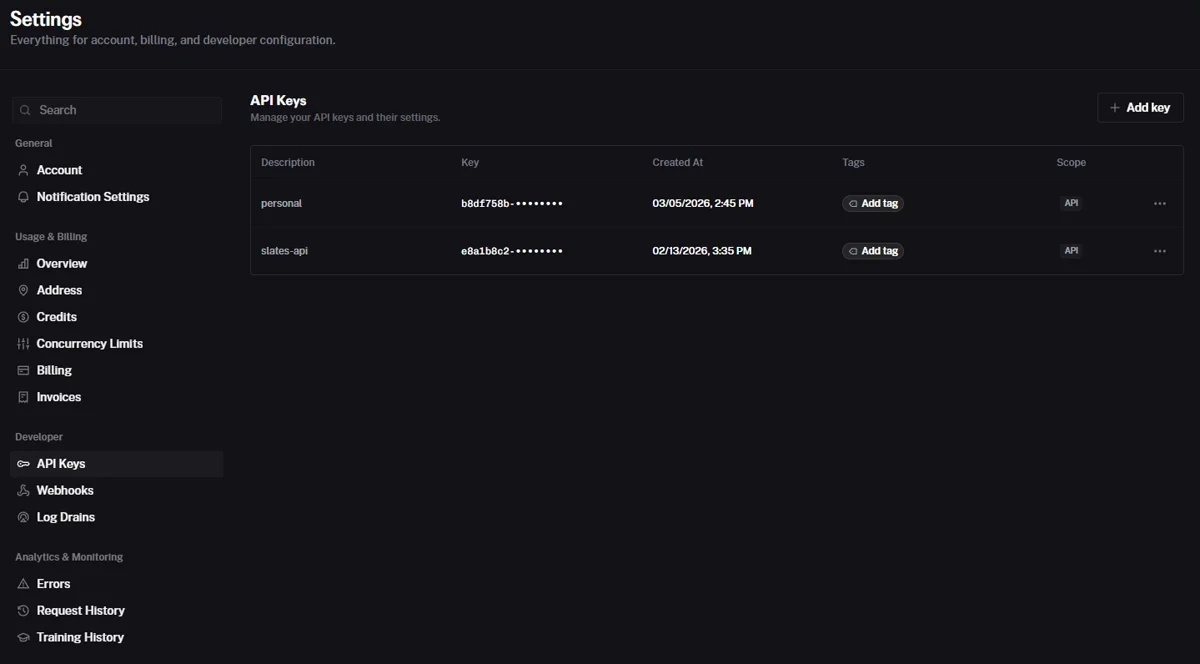
- ›Go to fal.ai and create an account
- ›Open Settings
- ›Click "API Keys" under the Developer section in the left sidebar
- ›Click "+ Add key" in the top right
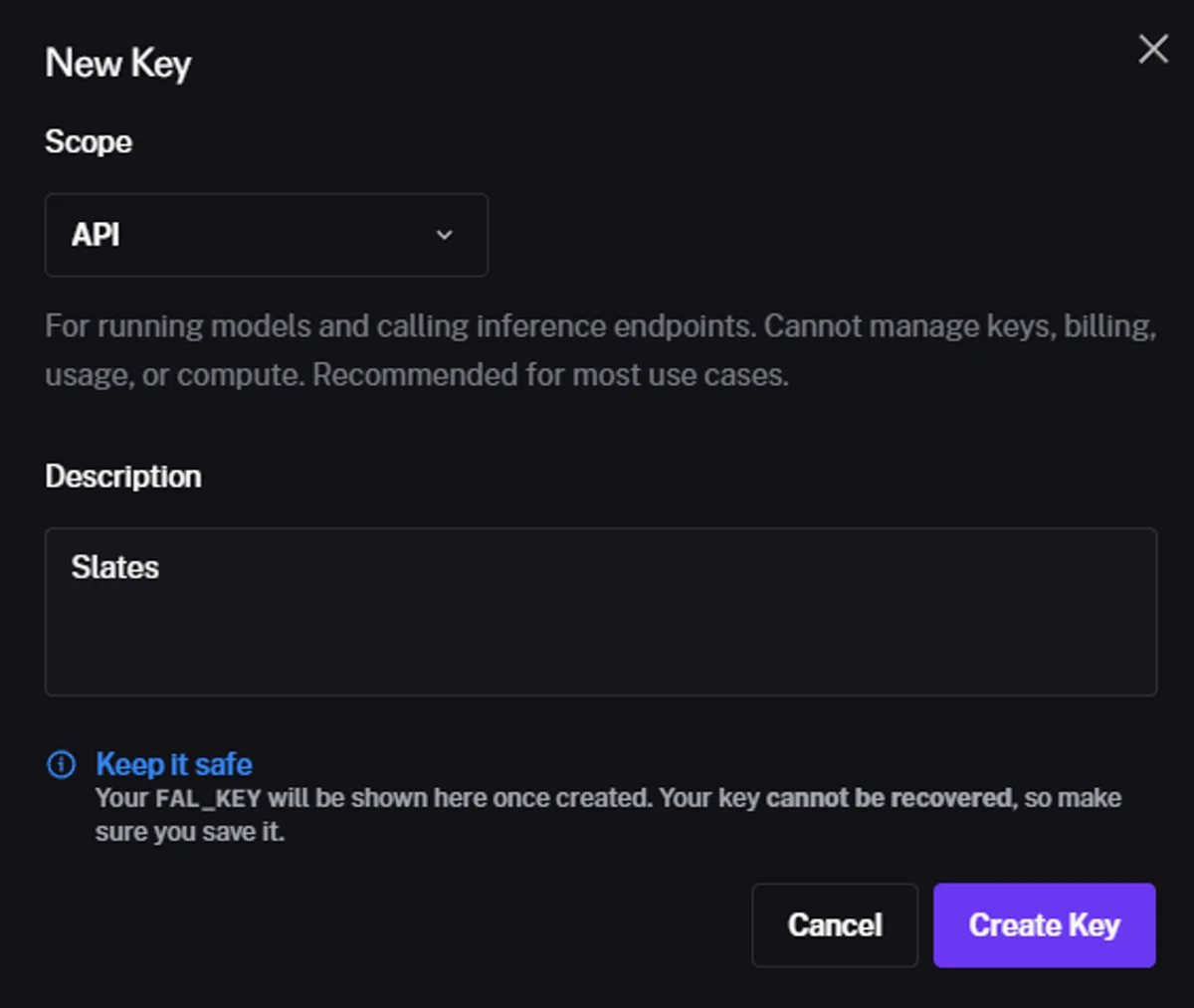
- ›Leave Scope set to "API" (the default), add a description, and click "Create Key"
- ›Copy the key immediately. It can't be recovered once you close the dialog.
Pay-as-you-go after your free credits run out.
fal.ai is the provider for Kling V3.0 (all tiers), Veo 3.1, FLUX.2 Max, Seedream 5 Lite, Nano Banana 2, lip sync, avatars, and motion control. One key covers a lot of models.
How Do You Set Up API Keys in Slates?
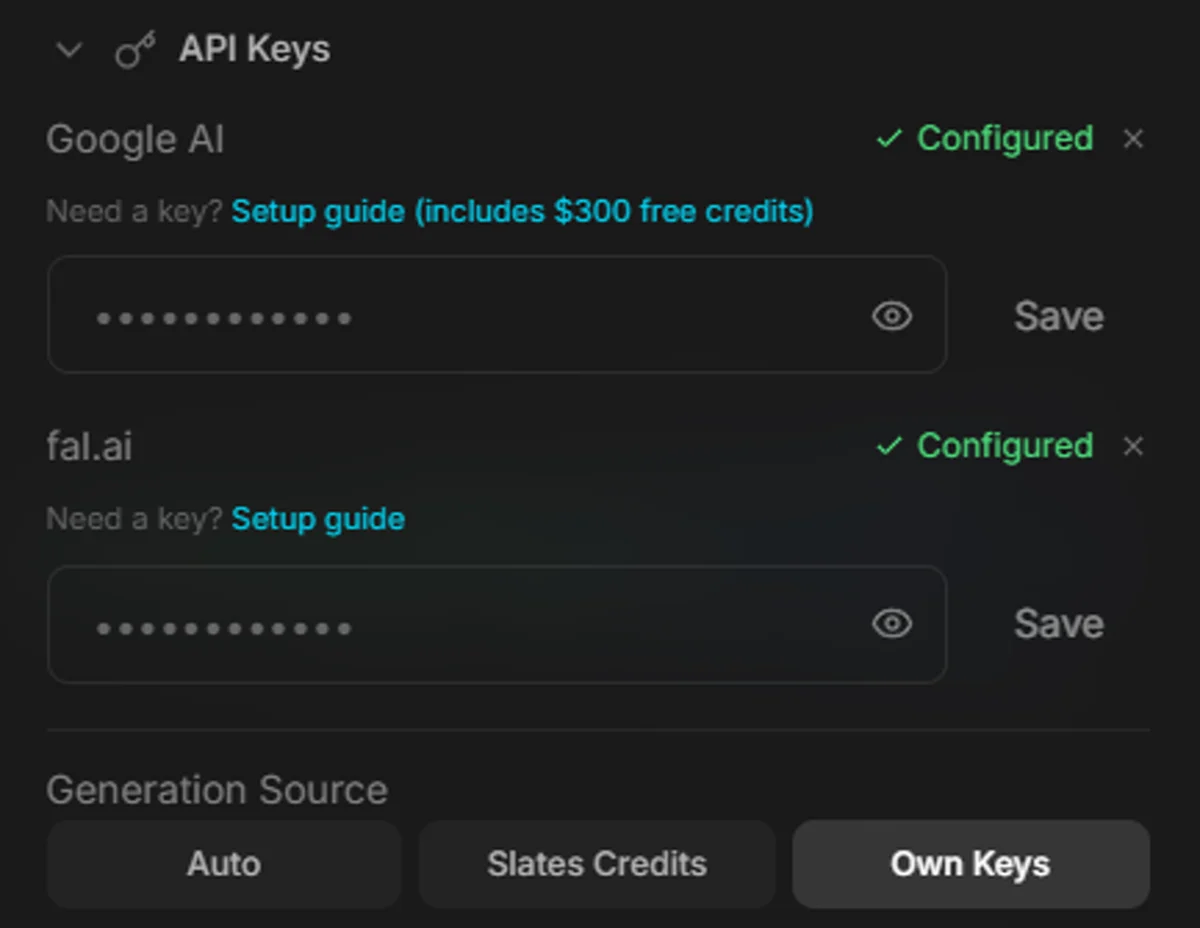
Once you have your keys, paste them into Slates Settings. The whole thing takes about 30 seconds. Every generation from that point forward charges the provider's published rate with zero markup.
- ›Open Slates
- ›Click the gear icon to open Settings
- ›Find the API Keys section
- ›Paste your Google API key in the Google AI field
- ›Paste your fal.ai key in the fal.ai field
- ›Close Settings
Slates shows the estimated cost in the UI before you hit generate, so there are no surprises. You can see exactly what each generation will cost before committing.
There's also a provider toggle in Settings. It lets you choose whether Kling generations route through fal.ai or Kling Direct, and whether Veo generations route through fal.ai or Google Direct. Useful if one provider is cheaper or faster for the model you use most.
How Much Does Each Generation Actually Cost?
Rates range from $0.035 per image (Seedream 5 Lite) to $0.60/second for video (Veo 3.1 Standard 4K with audio). Here's the full breakdown of what's available through your own keys.
Video Generation
| Model | Per Second | 5s Clip | 8s Clip |
|---|---|---|---|
| Kling V3 Standard (no audio) | $0.084 | $0.42 | $0.67 |
| Kling V3 Standard (with audio) | $0.126 | $0.63 | $1.01 |
| Kling V3 Pro (no audio) | $0.112 | $0.56 | $0.90 |
| Kling V3 Pro (with audio) | $0.168 | $0.84 | $1.34 |
| Kling V3 Omni (audio + dialogue) | $0.112 | $0.56 | $0.90 |
| Veo 3.1 Fast 1080p (no audio, fal.ai) | $0.10 | $0.50 | $0.80 |
| Veo 3.1 Fast 1080p (with audio) | $0.15 | $0.75 | $1.20 |
| Veo 3.1 Standard 1080p (with audio) | $0.40 | $2.00 | $3.20 |
| Veo 3.1 Fast 4K (with audio) | $0.35 | $1.75 | $2.80 |
Kling supports 3-15 second clips. Veo generates 4-8 second clips. Kling V3 Omni can generate multi-character dialogue with distinct voices and music in a single generation.
For a full comparison of what each model is best at, see the model comparison guide.
Image Generation
| Model | Provider | Cost Per Image |
|---|---|---|
| Seedream 5 Lite | fal.ai | $0.035 |
| Nano Banana 2 (1K) | Google Direct | $0.067 |
| FLUX.2 Max (1MP) | fal.ai | $0.07 |
| Nano Banana 2 (1K) | fal.ai | $0.08 |
| Nano Banana 2 (2K) | fal.ai | $0.12 |
| Nano Banana 2 (4K) | Google Direct | $0.151 |
Lip Sync, Avatars, and Motion Control
| Feature | Provider | Cost |
|---|---|---|
| Lip sync (audio to video) | fal.ai | $0.014/sec (5s blocks) |
| Avatar v2 Standard | fal.ai | $0.056/sec |
| Avatar v2 Pro | fal.ai | $0.115/sec |
| Motion control V3 Standard | fal.ai | $0.126/sec |
| Motion control V3 Pro | fal.ai | $0.168/sec |
For the full pricing breakdown across providers and subscription comparisons, see the pricing article.
Should You Use Your Own Keys or Slates Credits?
Your own keys are cheaper. Credits are easier. If you want the lowest possible cost, use your keys. If you want zero setup and don't mind a small markup, buy credits.
| Your Own Keys | Slates Credits | |
|---|---|---|
| Setup | ~5 minutes (one-time) | None. Buy and go. |
| Cost | Raw API rate | 1.5x the API rate |
| Billing | Direct from Google/fal.ai | Through Slates |
| Best for | Regular creators, lowest cost | Trying Slates out, quick projects |
| Credits expire? | N/A (pay-as-you-go) | Never |
The credit markup is 1.5x the fal.ai provider cost. So a generation that costs $1.00 with your own key costs $1.50 in Credits. That's still well under half what subscription platforms charge for the same thing.
You can switch between your own keys and Credits anytime. Every Slates license comes with $10 in free credits, so you can start creating immediately and set up your API keys later when you want to save more.
What If Something Goes Wrong?
Most issues come down to one of five things. Here's how to fix each one.
The most common problem is a partially copied key. Google keys start with AIzaSy and are about 39 characters. fal.ai keys are longer. If generations are failing right after setup, copy the key again and make sure you got the whole thing.
"I'm getting rate limit errors"
New fal.ai accounts start with 2 concurrent generation slots. You can only run 2 generations at the same time. As you add credit to your fal.ai balance, your concurrency limit increases (up to 40 slots at $1,000+ in total purchases). If you're hitting limits, wait a few seconds between generations or top up your fal.ai balance.
"My Google key stopped working"
Your prepaid balance ran out. Add more credit through Google AI Studio or your Google Cloud console.
"I want to switch which provider handles a specific model"
Open Settings in Slates. There's a provider toggle that lets you route Kling through fal.ai or Kling Direct, and Veo through fal.ai or Google Direct. Pick whichever gives you a better price or faster generations for your workflow.
"I set up my own keys but still want to use Credits sometimes"
Both work simultaneously. If you have keys set up and Credits on your account, you choose which to use per generation via the Generation Source toggle in Settings.
Frequently Asked Questions
Your API keys stay on your machine. Slates stores them locally inside the app. They're never sent to a Slates server. When you generate something, the API call goes directly from your desktop to Google or fal.ai. No middleman touches your keys.
Your costs go up, but so does everyone else's. Subscription platforms would raise prices too (or reduce credit allocations). The difference is you'll see the exact new rate in Slates before you generate. No surprises. And provider rate changes tend to be small and infrequent. The overall trend is downward.
Technically, yes. These are standard APIs. You could write code to call them directly. But you'd need to handle prompting, file management, video assembly, and the rest of the creative workflow yourself. Slates wraps all of that in a desktop app with a visual interface, storyboarding, a timeline editor, and export tools. The API key is just how you pay for the AI part.
A fal.ai key alone covers Kling, Veo, Nano Banana 2, FLUX.2 Max, and Seedream. So no, you don't strictly need both. But Google Direct gives you cheaper NB2 images ($0.067 vs $0.08) and includes audio free on all Veo generations. Most people end up setting up both.
Free tools like Runway's free tier give you a handful of low-resolution generations per month with watermarks and quality restrictions. Using your own API keys means no watermarks, no resolution caps, no generation limits, and full access to every model the provider offers. You pay per generation, but you control everything.
Prices verified against fal.ai and Google AI Studio documentation as of April 2026. See the pricing comparison for subscription vs pay-per-use math, or the model comparison for which model to use for which project.